



 I make no apologies for another post about Twitter. If you’re fed up with Twitter posts, you don’t have to read this one – but I’m going to make a case for why you should.
So keep reading.
Don’t think of the increasing user numbers we keep hearing about as just so much more noise you have to filter out if you’re on Twitter yourself. Remember, Twitter is an opt-in idea: you decide whether or not to open an account and then who to follow or not. You’re in control!
Instead, think of the stunning growth in people signing up to Twitter as more amazing listening opportunities to find out who’s saying what about you, your product, your brand, your client, or whatever it is that interests you in finding out what people are talking about online.
Listening on Twitter is ridiculously easy, something every PR ought to be doing as a routine thing.
How easy? As easy as 1-2-3:
1. Go to search.twitter.com, enter a key word or phrase into the search box and click ‘Search’. Let’s try that. Tesco, for instance: the UK retailer just announced record profits. So what’s the word on Twitter?

2. Review the results page to get a sense of what people are talking about. You could stay on this page, refreshing it in your browser as notifications come in of more results.

But, there’s a far more effective way to track the results to your keyword search, which is described in step 3.
3. Click on ‘Feed for this query’ you see at the top right of the search results page.
 That’s an RSS feed (actually, it’s Atom, but let’s not get sidetracked here) for the results of your search term, enabling you to receive updated results in your RSS reader.
If you already use an RSS reader and click on that link, it should present you with a dialog either in your favourite RSS application on your computer (FeedDemon, for instance, the one I use on my Windows PCs) or a link to an online reader such as Google Reader, Bloglines or NewsGator Online.

Just add it to you RSS reader of choice, then sit back as the results come rolling in.
Well, not quite as simplified as that but you get the idea. It really is simple to set up your own ‘listening post’ for Twitter. If you use a commercial monitoring service like Radian6 or Salesforce.com with that service’s Twitter integration, it’s even easier for you.
But what I’ve highlighted here is a simple yet highly effective data-gathering tool that anyone can use, and costs nothing at all other than your time and effort. And I’ve not even mentioned some of the terrific things you can easily do with Twitter’s Advanced Search options.

The 1-2-3 I’ve outlined here is the easy part, though. What you get is, basically, raw data as you do with any keyword search online (you’ll know that if you use Google Alerts for anything).
The trick is understanding what that raw data means. Who the people are who are tweeting: what they say, what their influence is among others who pay attention to what they say, on Twitter and elsewhere. Etc.
But 1-2-3 for listening is a pretty good start.
Now, some other directly-related thoughts for your listening pleasure – this chart and story yesterday on TechCrunch:
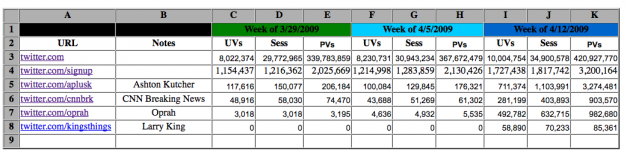
[…] Overall Twitter.com traffic went from 367 million to over 420 million for [last] week in terms of pageviews. Meanwhile, unique views went from just over 8 million, to over 10 million. The pageviews on Twitter’s signup page alone went up by over a million for the week.
These celebrities [Aston Kutcher and Oprah Winfrey] are having an amazing effect on Twitter’s growth. We crunched some numbers earlier today suggesting that perhaps over a million users signed up for Twitter following Oprah’s show.
“Twitter is poised to explode once again this month and will likely finish up over 30 million UVs for this month. If that happens they will double their March numbers and jump from #72 in our ranking into the Top 20,†according to a Compete analyst. That comes just a month after it already more than doubled its unique views (at least in the US) last month.
Wow. And remember, this data is only for Twitter’s website, it doesn’t include any of the usage from third-party sites/services.
Bonus story, in ReadWriteWeb: Scientists Break Brain/Twitter Barrier.
Keep listening. :)
Related posts:





32 responses to “Twitter is for listening”
Neville, this is all genius! Great tips indeed…
Twitter Comment
RT @mattuk: Twitter is for listening – [link to post]
– Posted using Chat Catcher
Twitter Comment
Twitter is for listening — NevilleHobson.com [link to post]
– Posted using Chat Catcher
Hi Neville,
Well you know you’ve hit a topic that’s near and dear to me, so thanks for that. :) Another trick I’ve found useful is to create a bit of a custom “dashboard” with iGoogle or Netvibes for multiple feeds. You can search on several independent terms, or search your brand, your competitors, and industry topics and see them all in one place.
Thanks for always advocating the importance of listening and monitoring in social media, and for the Radian6 mention. Much appreciated.
Cheers,
Amber Naslund
Director of Community, Radian6
@ambercadabra
Why not let the power of Google help you search Twitter: site:twitter.com dominos youtube OR video.
Plus search.twitter.com doesn’t go back very far. You can find older stuff using Google.
You can also add a date to the search to locate the first tweet on a subject: “apr 11th” and then go back a couple weeks or months until you find no hits and then forward and gradually narrow the window until you nail it.
[…] here to see the original: Twitter is for listening — NevilleHobson.com […]
[…] think Neville Hobson puts it well when he says Twitter is for listening. When Oprah joined Twitter, Twitter’s daily market share of Internet visits skyrocketed. […]
Good stuff, Neville. Anyone relatively new to Twitter might find this useful – Six Ways You Should Be Using Twitter That Dont Involve Breakfast- http://bit.ly/3q6OH.
Great post Neville,
I first read about the RSS feed option for Twitter search over on Chris Brogan’s blog (see http://www.chrisbrogan.com/how-to-listen-for-opportunities-on-twitter/ ) You’re right, in the wake of the massive growth lately, this is even more relevant.
I find of all the advanced search options, the “Near this place” geographic qualifier is very useful. Eg: if I wanted to know what people are saying about iPhone in Sydney I simply search for “iphone near:Sydney”
Its getting hard to remember what life was like before Twitter! :-)
Cheers
Tony
Thanks for those tips, Amber. I know about Netvibes, use that one myself for certain projects.
Agree, Tony, those advanced search options are useful. I often use the ‘from this person’ and/or the ‘to this person’ options: they work every time.
[…] Hobson saysTwitter is for listening. It’s a great opportunity to find out what people are saying about you or your company and […]
I watch search results delivered on Gravity, the Series 60 client for Nokia phones. It’s not as handy as the RSS flow of query results that you recommend but it’s faster than manually searching all the time.
Reading: Twitter is for listening http://twurl.nl/f0ph55
Twitter Comment
Excellent tips on how to monitor (“listen”) to Twitter: [link to post]. http://twurl.nl/xare5d
– Posted using Chat Catcher
Twitter Comment
RT @BarbaraNixon: Excellent tips on how to monitor Twitter: [link to post] via @addthis
– Posted using Chat Catcher
Twitter Comment
adding Twi [link to post] [link to post]
– Posted using Chat Catcher
RT @BarbaraNixon: Excellent tips on how to monitor (“listen”) to Twitter: http://tinyurl.com/d8phbj
[…] think Neville Hobson puts it well when he says Twitter is for listening. When Oprah joined Twitter, Twitter’s daily market share of Internet visits skyrocketed. […]
[…] Twitter is for listening […]
Twitter Comment
Any PR worth their salt should be listening on Twitter [link to post]
– Posted using Chat Catcher
Any PR worth their salt should be listening on Twitter http://bit.ly/10nnle
[…] than I write on Twitter, but that’s still using it. Neville Hobson recently wrote about how Twitter is for listening. For some of us, that is the biggest part of it, but still for others, it’s speaking. We […]
Twitter is for listening http://tinyurl.com/d8phbj
RT @amvr2medwriter: Twitter is for listening http://tinyurl.com/d8phbj
Twitter is for listening — NevilleHobson.com http://bit.ly/1bhaVC
Not new, but I just discovered Neville Hobson’s post: Twitter is for Listening http://bit.ly/lcb8B
Twitter is for listening http://bit.ly/9CoY7
[…] than I write on Twitter, but that’s still using it. Neville Hobson recently wrote about how Twitter is for listening. For some of us, that is the biggest part of it, but still for others, it’s speaking. We […]
Good article for marketers and PR – useful RSS tips RT @jangles Twitter is for listening — NevilleHobson.com http://bit.ly/9eXZ1
Twitter Comment
Good article for marketers and PR – useful RSS tips RT @jangles Twitter is for listening — NevilleHobson.com [link to post]
– Posted using Chat Catcher
RT @jangles Twitter is for listening — NevilleHobson.com http://bit.ly/9eXZ1
Twitter Comment
RT @jangles Twitter is for listening — NevilleHobson.com [link to post]
– Posted using Chat Catcher